
How to deal with scenarios#
1. How is a scenario defined?#
1.a. What is a scenario?#
A scenario is an interface that:
creates an optimization or sampling problem,
from a set of disciplines and a multidisciplinary formulation based on a design space and on an objective name,
executes it from an optimization or sampling algorithm with mandatory arguments and options and
post-process it.
1.b. How does a scenario is implemented in GEMSEO?#
Programmatically speaking, scenarios are implemented in GEMSEO through the BaseScenario abstract class
inheriting from the Discipline class and derived classes:
The
MDOScenarioclass inheriting fromBaseScenariois dedicated to optimization processes.The
DOEScenarioclass inheriting fromBaseScenariois dedicated to trade-off studies and sampling processes.
A BaseScenario is defined by four main elements:
the
disciplinesattribute: the list ofDiscipline,the
formulationattribute: the multidisciplinary formulation based onDesignSpace,the
optimization_resultattribute: the optimization results,the
post_factoryattribute: the post-processing set of methods.
1.c. What are the API functions in GEMSEO?#
After the instantiation of the different Discipline,
an instance of this scenario can be created from the create_scenario() API function whose arguments are:
disciplines: thelistof instantiatedDiscipline,objective_name: the objective name (str)design_space: the instantiatedDesignSpace,name=None: the optional name of the scenario (str),scenario_type='MDO': the optional type of scenario ('MDO'or'DOE'),maximize_objective=False: the choice between maximizing or minimizing the objective function (bool),formulation_settings_model: the formulation settings as a Pydantic model (BaseFormulationSettings)**formulation_settings: settings passed to the multidisciplinary formulation, in case noformulation_settings_modelis specified. In this case theformulation_name(str) is mandatory.
The types of scenarios already implemented in GEMSEO can be obtained by means of the get_available_scenario_types() API function:
from gemseo import get_available_scenario_types

get_available_scenario_types():
which results in:
["MDO", "DOE"]
2. How to create a scenario?#
We can easily create an MDOScenario or a DOEScenario
from the create_scenario() API function.
2.a. Instantiate the disciplines#
For that, we first instantiate the different Discipline, e.g.
from gemseo import create_discipline

disciplines = create_discipline(['Sellar1', 'Sellar2', 'SellarSystem'])
2.b. Define the design space#
Then, we define the design space,
either by instantiating a DesignSpace,
from gemseo.problems.mdo.sellar.sellar_design_space import SellarDesignSpace

design_space = SellarDesignSpace()
or by means of the file path of the design space:
design_space = 'path_to_sellar_design_space.csv'
2.c. Define the objective function#
The objective function should be an output taken among the output list of the different Discipline, e.g.
objective_name = 'obj'
2.d. Define the multidisciplinary formulation and its settings#
From the design space and the objective name,
the BaseScenario automatically builds an multidisciplinary formulation
corresponding to a multidisciplinary formulation name specified by the user, e.g.
formulation_settings_model = MDF_Settings()
or:
formulation_name = 'MDF'
The list of the different available formulations can be obtained by means of the get_available_formulations() API function:
from gemseo import get_available_formulations

get_available_formulations()
which yields:
['BiLevel', 'IDF', 'MDF', 'DisciplinaryOpt']
Note
argument=value formulation options can also be passed to the create_scenario() API function.
Available options for the different formulations are presented in MDO formulations.
2.e. Choose the type of scenario#
Just before the BaseScenario instantiation,
the type of scenario must be chosen, e.g.
scenario_type = 'MDO'
Remind that the different types of scenario can be obtained by means of the get_available_scenario_types() API function:
from gemseo import get_available_scenario_types

get_available_scenario_types()
which yields:
['MDO', 'DOE']
2.f. Instantiate the scenario#
From these different elements, we can instantiate the BaseScenario
by means of the create_scenario() API function:
from gemseo import create_scenario

scenario = create_scenario(
    disciplines=disciplines,
    objective_name=objective_name,
    design_space=design_space,
    scenario_type=scenario_type,
    formulation_settings_model=formulation_settings_model,
)
or:
scenario = create_scenario(
    disciplines=disciplines,
    objective_name=objective_name,
    design_space=design_space,
    scenario_type=scenario_type,
    formulation_name=formulation_name,
)
2.g. Get the names of design variables#
We can use the BaseScenario.get_optim_variable_names() method of the BaseScenario
to access formulation design variables names in a convenient way:
print(scenario.get_optim_variable_names)
which yields:
['x_local', 'x_shared']
2.g. Get the design space#
The design space can be accessed using the BaseScenario.design_space property of the BaseScenario:
print(scenario.design_space)
which yields:
+----------+-------------+--------+-------------+-------+
| name     | lower_bound | value  | upper_bound | type  |
+----------+-------------+--------+-------------+-------+
| x_local  |      0      | (1+0j) |      10     | float |
| x_shared |     -10     | (4+0j) |      10     | float |
| x_shared |      0      | (3+0j) |      10     | float |
+----------+-------------+--------+-------------+-------+
2.h. Visualize the scenario before execute it (XDSM graph)#
The simplest way to visualize how the BaseScenario manages the workflow and dataflow before to execute it
is to log them in the console or in a file using GEMSEO's logger.
The method BaseScenario.xdsmize() of the BaseScenario
can be used to this aim (monitor=True).
If save_html (default True), will generate a self contained HTML file, that can be automatically open using the option show_html=True.
If save_json is True, it will generate a XDSMjs input file XDSM visualization.
It will log the status of the workflow if log_workflow_status=True:
scenario.xdsmize(monitor=True, log_workflow_status=True, show_html=False)
which yields:
INFO - 13:21:18 : {MDOScenario(RUNNING), {MDAChain(PENDING), [{MDAJacobi(None), (Sellar1(None), Sellar2(None), ), }, SellarSystem(None), ], }, }
INFO - 13:21:18 : {MDOScenario(RUNNING), {MDAChain(RUNNING), [{MDAJacobi(PENDING), (Sellar1(None), Sellar2(None), ), }, SellarSystem(None), ], }, }
INFO - 13:21:18 : {MDOScenario(RUNNING), {MDAChain(RUNNING), [{MDAJacobi(RUNNING), (Sellar1(PENDING), Sellar2(PENDING), ), }, SellarSystem(None), ], }, }
INFO - 13:21:18 : {MDOScenario(RUNNING), {MDAChain(RUNNING), [{MDAJacobi(RUNNING), (Sellar1(RUNNING), Sellar2(RUNNING), ), }, SellarSystem(None), ], }, }
INFO - 13:21:18 : {MDOScenario(RUNNING), {MDAChain(RUNNING), [{MDAJacobi(RUNNING), (Sellar1(DONE), Sellar2(RUNNING), ), }, SellarSystem(None), ], }, }
INFO - 13:21:18 : {MDOScenario(RUNNING), {MDAChain(RUNNING), [{MDAJacobi(RUNNING), (Sellar1(PENDING), Sellar2(PENDING), ), }, SellarSystem(None), ], }, }
INFO - 13:21:18 : {MDOScenario(RUNNING), {MDAChain(RUNNING), [{MDAJacobi(RUNNING), (Sellar1(PENDING), Sellar2(PENDING), ), }, SellarSystem(None), ], }, }
INFO - 13:21:18 : {MDOScenario(RUNNING), {MDAChain(RUNNING), [{MDAJacobi(RUNNING), (Sellar1(RUNNING), Sellar2(RUNNING), ), }, SellarSystem(None), ], }, }
...
and
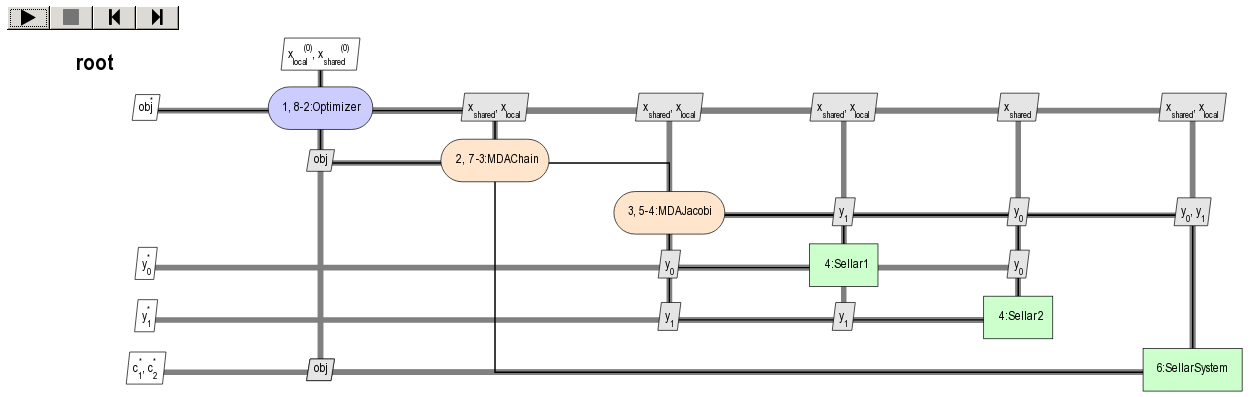
Moreover,
you can save the XDSM into a PDF file
by setting the argument save_pdf of the BaseScenario.xdsmize() method to True
and leaving the argument pdf_build to True
(if pdf_build is False, only the TikZ and LaTeX files will be generated and it will be up to you to compile the LaTeX file):
scenario.xdsmize(save_pdf=True)
eventually specifying the output directory directory_path='SOME_PATH'.
3. How to execute a scenario?#
When the BaseScenario is created, we can execute it to solve the optimization problem, e.g.
scenario.execute(algo_name="SLSQP", max_iter=100) # MDO case
or sampling the problem, e.g.
doe_scenario = create_scenario(
    disciplines=disciplines,
    formulation=formulation,
    objective_name=objective_name,
    design_space=design_space,
    scenario_type="DOE",
)
doe_scenario.execute(algo_name="PYDOE_LHS", n_samples=100) # DOE case
Note
MDOScenario.execute() and DOEScenario.execute() use an algorithm name (algo_name)
as well as settings, passed either as a Pydantic model (settings_model) or as keyword arguments
(see BaseScenario.get_available_driver_names() for a complete list of algorithm names).
In particular,
MDOScenario requires the mandatory setting parameter max_iter
corresponding to the maximum number of iterations of the optimization algorithm
and MDOScenario the mandatory setting parameter n_samples or other setting parameters to deduce it.
See also
We can print scenario information (disciplines, MDO formulation and algorithm):
repr(scenario)
which yields:
MDOScenario:
Disciplines: Sellar1 Sellar2 SellarSystem
MDOFormulation: MDF
Algorithm: SLSQP
4. How to get the optimum solution?#
Once the BaseScenario is executed, the optimum results can be found in the execution log.
It is also possible to extract them by invoking the BaseScenario.get_optimum() method of the BaseScenario class.
It returns a dictionary containing the optimum results for the scenario under consideration:
opt_results = scenario.get_optimum()
print("The solution of P is (x*,f(x*)) = ({}, {})".format(
    opt_results.x_opt, opt_results.f_opt
))
which yields:
The solution of P is (x*,f(x*)) = ([ 0.00000000e+00 5.81632893e-01 6.38978246e-10], (0.527289923509+0j)).
5. How to log disciplinary and total execution metrics?#
The BaseScenario.print_execution_metrics() method of the BaseScenario class
adds disciplinary and total execution metrics in the logs:
scenario.print_execution_metrics()
which yields:
INFO - 12:50:53 : * BaseScenario Executions statistics *
INFO - 12:50:53 : * Discipline: Sellar1
INFO - 12:50:53 : Executions number: 128
INFO - 12:50:53 : Execution time:  0.00471186637878 s
INFO - 12:50:53 : Linearizations number: 9
INFO - 12:50:53 : * Discipline: Sellar2
INFO - 12:50:53 : Executions number: 128
INFO - 12:50:53 : Execution time:  0.0041139125824 s
INFO - 12:50:53 : Linearizations number: 9
INFO - 12:50:53 : * Discipline: SellarSystem
INFO - 12:50:53 : Executions number: 15
INFO - 12:50:53 : Execution time:  0.00153756141663 s
INFO - 12:50:53 : Linearizations number: 9
INFO - 12:50:53 : Total number of executions calls 271
INFO - 12:50:53 : Total number of linearizations 27
6. How to visualize the scenario execution and results?#
GEMSEO provides many post-processing tools which can be called
either by means of the BaseScenario.post_process() method of the BaseScenario class
or by means of the execute_post() API function.
BaseScenario.post_process() method of the BaseScenario class
returns the list of available post-processing methods.
Find more information about post-processing and visualization here: How to deal with post-processing.