
Note
Go to the end to download the full example code.
BiLevel-based DOE on the Sobieski SSBJ test case#
from __future__ import annotations

from copy import deepcopy
from os import name as os_name

from gemseo import create_discipline
from gemseo import create_scenario
from gemseo import execute_post
from gemseo.problems.mdo.sobieski.core.design_space import SobieskiDesignSpace
Instantiate the disciplines#
First, we instantiate the four disciplines of the use case:
SobieskiPropulsion,
SobieskiAerodynamics,
SobieskiMission
and SobieskiStructure.
propu, aero, mission, struct = create_discipline([
    "SobieskiPropulsion",
    "SobieskiAerodynamics",
    "SobieskiMission",
    "SobieskiStructure",
])
Build, execute and post-process the scenario#
Then, we build the scenario which links the disciplines
with the formulation and the optimization algorithm. Here, we use the
BiLevel formulation. We tell the scenario to minimize -y_4
instead of minimizing y_4 (range), which is the default option.
We need to define the design space.
design_space = SobieskiDesignSpace()
Then, we build a sub-scenario for each strongly coupled disciplines.
Build a sub-scenario for Propulsion#
This sub-scenario will minimize SFC.
sc_prop = create_scenario(
    propu,
    "y_34",
    design_space.filter("x_3", copy=True),
    name="PropulsionScenario",
    formulation_name="DisciplinaryOpt",
)
Build a sub-scenario for Aerodynamics#
This sub-scenario will minimize L/D.
sc_aero = create_scenario(
    aero,
    "y_24",
    design_space.filter("x_2", copy=True),
    name="AerodynamicsScenario",
    maximize_objective=True,
    formulation_name="DisciplinaryOpt",
)
Build a sub-scenario for Structure#
This sub-scenario will maximize log(aircraft total weight / (aircraft total weight - fuel weight)).
sc_str = create_scenario(
    struct,
    "y_11",
    deepcopy(design_space).filter("x_1"),
    name="StructureScenario",
    maximize_objective=True,
    formulation_name="DisciplinaryOpt",
)
Build a scenario for Mission#
This scenario is based on the three previous sub-scenarios and on the Mission and aims to maximize the range (Breguet).
sub_disciplines = [sc_prop, sc_aero, sc_str, mission]
system_scenario = create_scenario(
    sub_disciplines,
    "y_4",
    design_space.filter("x_shared", copy=True),
    parallel_scenarios=False,
    reset_x0_before_opt=True,
    scenario_type="DOE",
    formulation_name="BiLevel",
    save_opt_history="True",
    naming="UUID",
)
Note
Setting reset_x0_before_opt=True is mandatory when doing a DOE
in parallel. If we want reproducible results, don't reuse previous xopt.
Tip
When running BiLevel scenarios, it is interesting to access the optimization
history of the sub-scenarios for each system iteration. By default, the setting
keep_opt_history is set to True. This allows you to store in memory the
databases of the sub-scenarios (see the last section of this example for more
details).
In some cases, storing the databases in memory can take up too much space and cause
performance issues. In these cases, set keep_opt_history=False and save the
databases to the disk using save_opt_history=True. If your sub-scenarios are
running in parallel, and you are saving the optimization histories to the disk, set
the naming setting to "UUID", which is multiprocessing-safe.
The setting keep_opt_history will not work if the sub-scenarios are running in
parallel because the databases are not copied from the sub-processes to the main
process. In this case you shall always save the optimization history to the disk.
system_scenario.formulation.mda1.warm_start = False
system_scenario.formulation.mda2.warm_start = False
Note
This is mandatory when doing a DOE in parallel if we want always exactly the same results, don't warm start mda1 to have exactly the same process whatever the execution order and process dispatch.
for sub_sc in sub_disciplines[0:3]:
    sub_sc.set_algorithm(algo_name="L-BFGS-B", max_iter=20)
Visualize the XDSM#
Generate the XDSM on the fly:
log_workflow_status=Truewill log the status of the workflow in the console,save_html(defaultTrue) will generate a self-contained HTML file, that can be automatically opened usingshow_html=True.
system_scenario.xdsmize(save_html=False)
Multiprocessing#
It is possible to run a DOE in parallel using multiprocessing, in order to do this, we specify the number of processes to be used for the computation of the samples.
Warning
The multiprocessing option has some limitations on Windows.
Due to problems with sphinx, we disable it in this example.
The features MemoryFullCache and HDF5Cache are not
available for multiprocessing on Windows.
As an alternative, we recommend the method
DOEScenario.set_optimization_history_backup().
n_processes = 1 if os_name == "nt" else 4
system_scenario.execute(algo_name="PYDOE_LHS", n_samples=30, n_processes=n_processes)

system_scenario.print_execution_metrics()
INFO - 16:24:06: *** Start DOEScenario execution ***
INFO - 16:24:06: DOEScenario
INFO - 16:24:06:    Disciplines: AerodynamicsScenario PropulsionScenario SobieskiMission StructureScenario
INFO - 16:24:06:    MDO formulation: BiLevel
INFO - 16:24:06: Optimization problem:
INFO - 16:24:06:    minimize y_4(x_shared)
INFO - 16:24:06:    with respect to x_shared
INFO - 16:24:06:    over the design space:
INFO - 16:24:06:       +-------------+-------------+-------+-------------+-------+
INFO - 16:24:06:       | Name        | Lower bound | Value | Upper bound | Type  |
INFO - 16:24:06:       +-------------+-------------+-------+-------------+-------+
INFO - 16:24:06:       | x_shared[0] |     0.01    |  0.05 |     0.09    | float |
INFO - 16:24:06:       | x_shared[1] |    30000    | 45000 |    60000    | float |
INFO - 16:24:06:       | x_shared[2] |     1.4     |  1.6  |     1.8     | float |
INFO - 16:24:06:       | x_shared[3] |     2.5     |  5.5  |     8.5     | float |
INFO - 16:24:06:       | x_shared[4] |      40     |   55  |      70     | float |
INFO - 16:24:06:       | x_shared[5] |     500     |  1000 |     1500    | float |
INFO - 16:24:06:       +-------------+-------------+-------+-------------+-------+
INFO - 16:24:06: Solving optimization problem with algorithm PYDOE_LHS:
INFO - 16:24:06: Running DOE in parallel on n_processes = 4
INFO - 16:24:06:      3%|▎         | 1/30 [00:00<00:06,  4.78 it/sec, feas=True, obj=247]
INFO - 16:24:06:      7%|▋         | 2/30 [00:00<00:03,  7.83 it/sec, feas=True, obj=485]
INFO - 16:24:06:     10%|█         | 3/30 [00:00<00:02, 10.51 it/sec, feas=True, obj=388]
INFO - 16:24:06:     13%|█▎        | 4/30 [00:00<00:01, 13.33 it/sec, feas=True, obj=350]
INFO - 16:24:06:     17%|█▋        | 5/30 [00:00<00:01, 14.83 it/sec, feas=True, obj=621]
INFO - 16:24:06:     20%|██        | 6/30 [00:00<00:01, 14.68 it/sec, feas=True, obj=458]
INFO - 16:24:06:     23%|██▎       | 7/30 [00:00<00:01, 16.47 it/sec, feas=True, obj=495]
INFO - 16:24:07:     27%|██▋       | 8/30 [00:00<00:01, 16.52 it/sec, feas=True, obj=549]
INFO - 16:24:07:     30%|███       | 9/30 [00:00<00:01, 18.15 it/sec, feas=True, obj=367]
INFO - 16:24:07:     33%|███▎      | 10/30 [00:00<00:01, 17.67 it/sec, feas=True, obj=892]
INFO - 16:24:07:     37%|███▋      | 11/30 [00:00<00:00, 19.26 it/sec, feas=True, obj=918]
INFO - 16:24:07:     40%|████      | 12/30 [00:00<00:00, 18.89 it/sec, feas=True, obj=1.27e+3]
INFO - 16:24:07:     43%|████▎     | 13/30 [00:00<00:00, 19.35 it/sec, feas=True, obj=354]
INFO - 16:24:07:     47%|████▋     | 14/30 [00:00<00:00, 20.20 it/sec, feas=True, obj=415]
INFO - 16:24:07:     50%|█████     | 15/30 [00:00<00:00, 19.91 it/sec, feas=True, obj=337]
INFO - 16:24:07:     53%|█████▎    | 16/30 [00:00<00:00, 20.14 it/sec, feas=True, obj=2.27e+3]
INFO - 16:24:07:     57%|█████▋    | 17/30 [00:00<00:00, 21.31 it/sec, feas=True, obj=1.2e+3]
INFO - 16:24:07:     60%|██████    | 18/30 [00:00<00:00, 20.85 it/sec, feas=True, obj=380]
INFO - 16:24:07:     63%|██████▎   | 19/30 [00:00<00:00, 21.21 it/sec, feas=True, obj=394]
INFO - 16:24:07:     67%|██████▋   | 20/30 [00:00<00:00, 21.82 it/sec, feas=True, obj=829]
INFO - 16:24:07:     70%|███████   | 21/30 [00:00<00:00, 22.14 it/sec, feas=True, obj=832]
INFO - 16:24:07:     73%|███████▎  | 22/30 [00:01<00:00, 21.80 it/sec, feas=True, obj=1.04e+3]
INFO - 16:24:07:     77%|███████▋  | 23/30 [00:01<00:00, 22.48 it/sec, feas=True, obj=1.21e+3]
INFO - 16:24:07:     80%|████████  | 24/30 [00:01<00:00, 22.56 it/sec, feas=True, obj=640]
INFO - 16:24:07:     83%|████████▎ | 25/30 [00:01<00:00, 21.95 it/sec, feas=True, obj=1.19e+3]
INFO - 16:24:07:     87%|████████▋ | 26/30 [00:01<00:00, 21.96 it/sec, feas=True, obj=470]
INFO - 16:24:07:     90%|█████████ | 27/30 [00:01<00:00, 22.58 it/sec, feas=True, obj=293]
INFO - 16:24:07:     93%|█████████▎| 28/30 [00:01<00:00, 23.39 it/sec, feas=True, obj=484]
INFO - 16:24:07:     97%|█████████▋| 29/30 [00:01<00:00, 23.48 it/sec, feas=True, obj=647]
INFO - 16:24:07:    100%|██████████| 30/30 [00:01<00:00, 23.69 it/sec, feas=True, obj=952]
INFO - 16:24:07: Optimization result:
INFO - 16:24:07:    Optimizer info:
INFO - 16:24:07:       Status: None
INFO - 16:24:07:       Message: None
INFO - 16:24:07:    Solution:
INFO - 16:24:07:       Objective: 246.89549262432172
INFO - 16:24:07:       Design space:
INFO - 16:24:07:          +-------------+-------------+---------------------+-------------+-------+
INFO - 16:24:07:          | Name        | Lower bound |        Value        | Upper bound | Type  |
INFO - 16:24:07:          +-------------+-------------+---------------------+-------------+-------+
INFO - 16:24:07:          | x_shared[0] |     0.01    | 0.01316336056367379 |     0.09    | float |
INFO - 16:24:07:          | x_shared[1] |    30000    |  39053.36254511708  |    60000    | float |
INFO - 16:24:07:          | x_shared[2] |     1.4     |  1.759600266521177  |     1.8     | float |
INFO - 16:24:07:          | x_shared[3] |     2.5     |  8.352983911532561  |     8.5     | float |
INFO - 16:24:07:          | x_shared[4] |      40     |  66.23984775914758  |      70     | float |
INFO - 16:24:07:          | x_shared[5] |     500     |  1232.319858277323  |     1500    | float |
INFO - 16:24:07:          +-------------+-------------+---------------------+-------------+-------+
INFO - 16:24:07: *** End DOEScenario execution ***
INFO - 16:24:07: The discipline counters are disabled.
Warning
On Windows, the progress bar may show duplicated instances during the initialization of each subprocess. In some cases it may also print the conclusion of an iteration ahead of another one that was concluded first. This is a consequence of the pickling process and does not affect the computations of the scenario.
Exporting the problem data.#
After the execution of the scenario, you may want to export your data to use it
elsewhere. The method Scenario.to_dataset() will allow you to export
your results to a Dataset, the basic GEMSEO class to store data.
dataset = system_scenario.to_dataset("a_name_for_my_dataset")
Plot the optimization history view#
system_scenario.post_process(post_name="OptHistoryView", save=False, show=True)
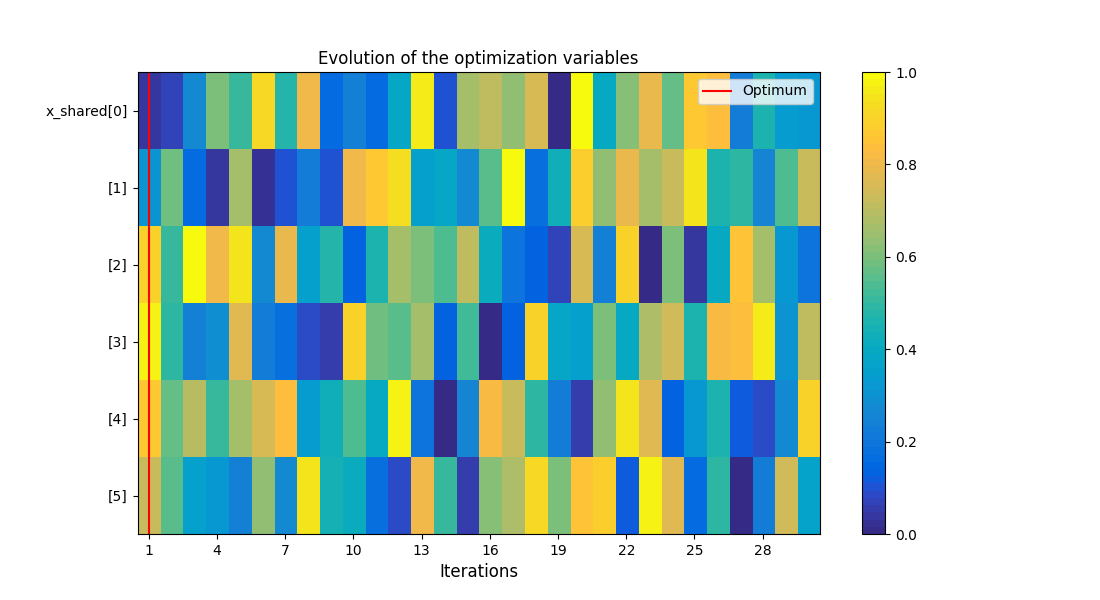
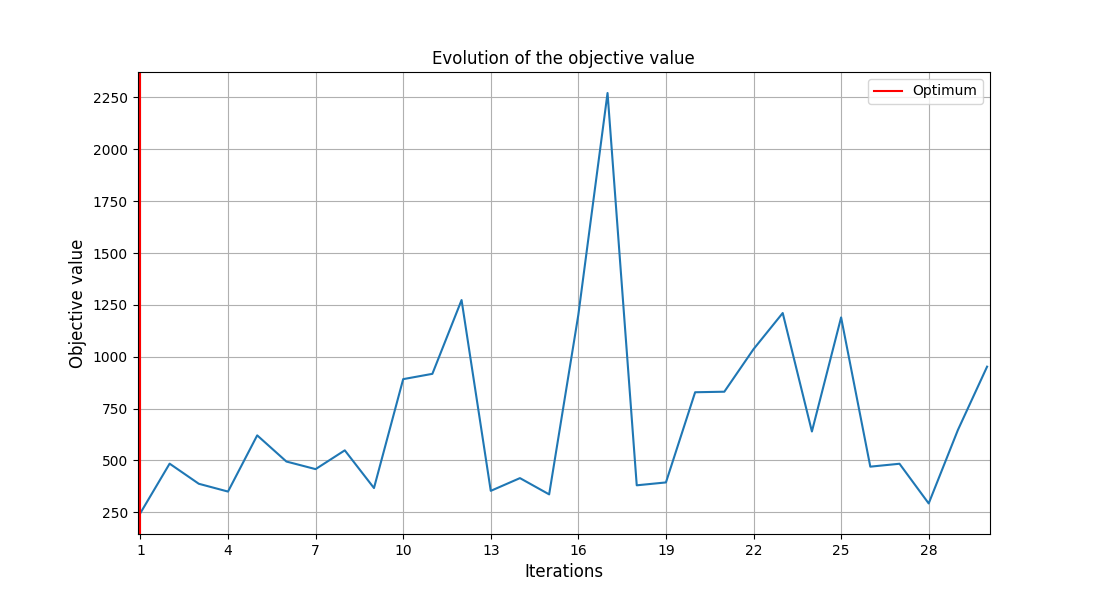
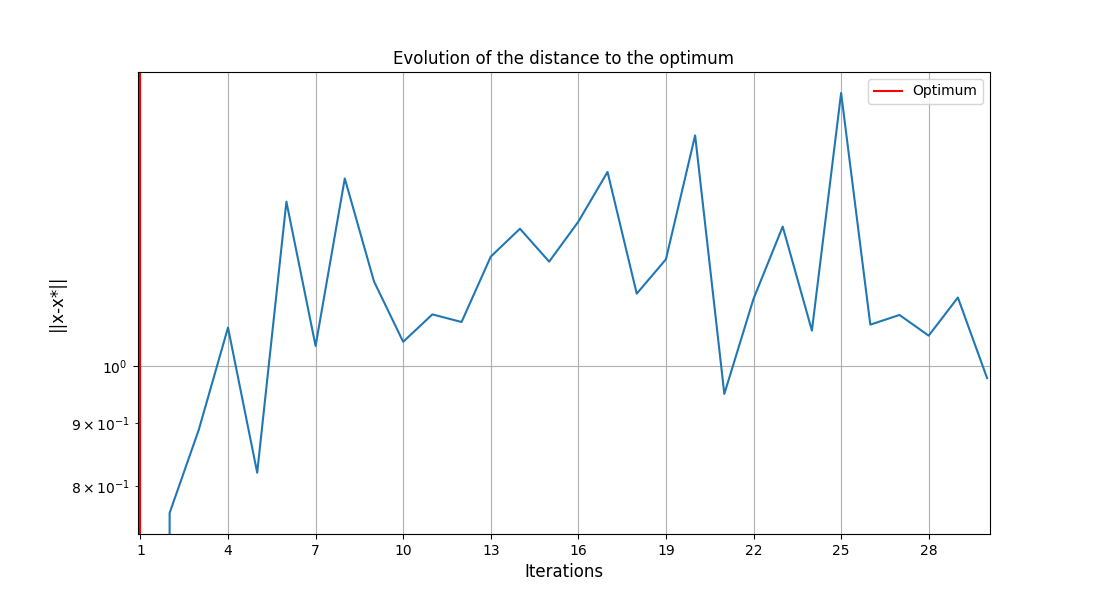
<gemseo.post.opt_history_view.OptHistoryView object at 0x72a4d56037a0>
Plot the scatter matrix#
system_scenario.post_process(
    post_name="ScatterPlotMatrix",
    variable_names=["y_4", "x_shared"],
    save=False,
    show=True,
)
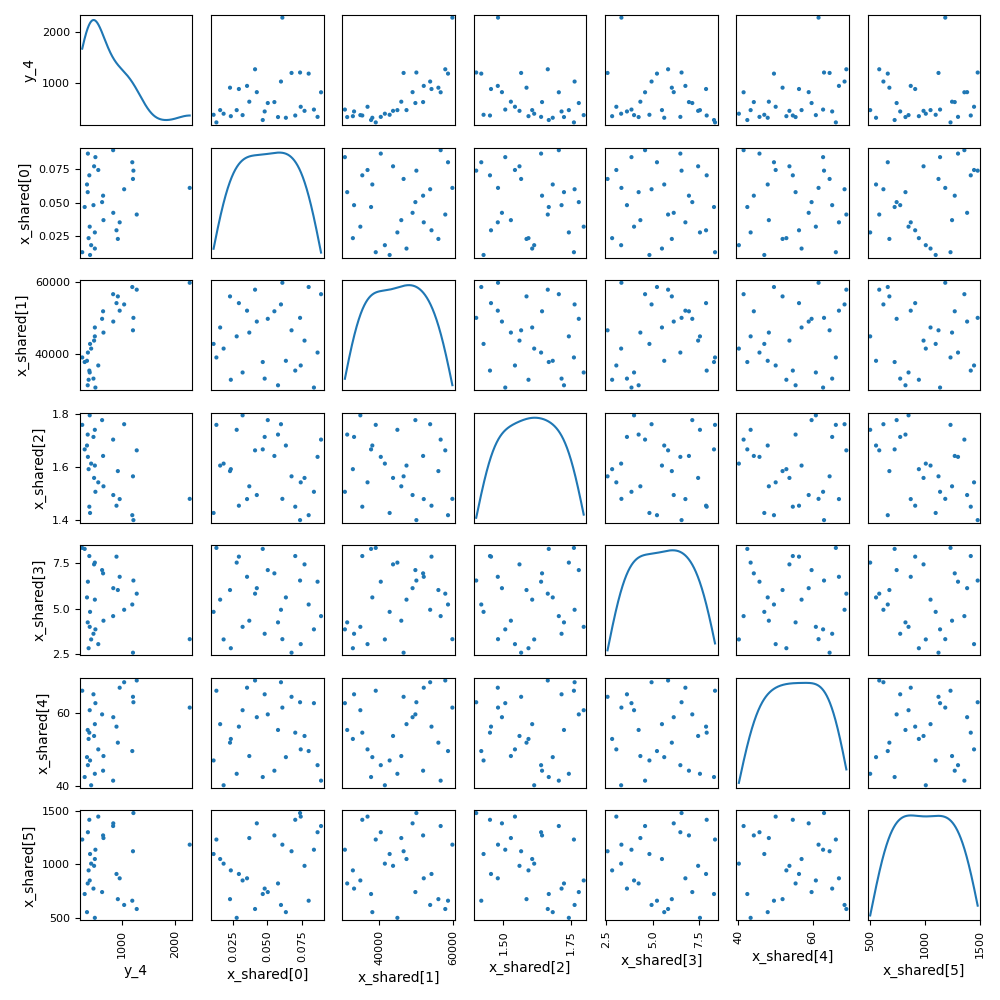
<gemseo.post.scatter_plot_matrix.ScatterPlotMatrix object at 0x72a4d8779250>
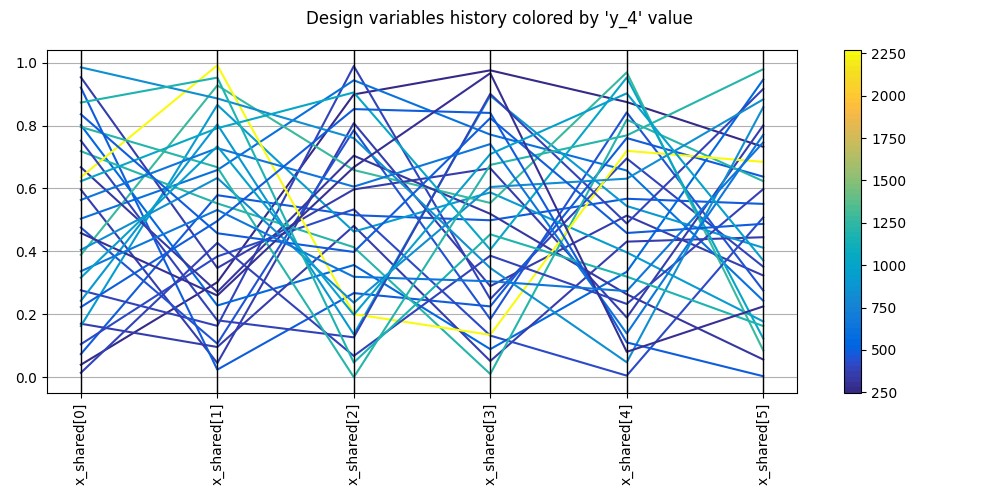
Plot parallel coordinates#
system_scenario.post_process(post_name="ParallelCoordinates", save=False, show=True)
<gemseo.post.parallel_coordinates.ParallelCoordinates object at 0x72a4d5ba7080>
Plot correlations#
system_scenario.post_process(post_name="Correlations", save=False, show=True)
    INFO - 16:24:09: Detected 0 correlations > 0.95

<gemseo.post.correlations.Correlations object at 0x72a4e3c95880>
Plot the structure optimization histories of the 2 first iterations#
The code below will not work if you ran the system scenario with n_processes > 1.
Indeed, parallel execution of sub-scenarios prevents us to save the databases from
each sub-process to the main process. If you ran the system scenario with many
processes, you can still save the databases to the disk with
save_opt_history=True and naming="UUID". Refer to the formulation settings for
more information.
struct_databases = system_scenario.formulation.scenario_adapters[2].databases
for database in struct_databases[:2]:
    opt_problem = deepcopy(sc_str.formulation.optimization_problem)
    opt_problem.database = database
    execute_post(opt_problem, post_name="OptHistoryView", save=False, show=True)
Total running time of the script: (0 minutes 2.759 seconds)