
Note
Go to the end to download the full example code.
Probability distributions based on SciPy#
In this example, we seek to create a probability distribution based on the SciPy library.
from __future__ import annotations

from gemseo.uncertainty import create_distribution
from gemseo.uncertainty import get_available_distributions
from gemseo.uncertainty.distributions.scipy.distribution_settings import (
    SPDistribution_Settings,
)
from gemseo.uncertainty.distributions.scipy.normal_settings import (
    SPNormalDistribution_Settings,
)
First of all, we can access the names of the available probability distributions from the API:
all_distributions = get_available_distributions()
all_distributions
['OTBetaDistribution', 'OTDiracDistribution', 'OTDistribution', 'OTExponentialDistribution', 'OTJointDistribution', 'OTLogNormalDistribution', 'OTNormalDistribution', 'OTTriangularDistribution', 'OTUniformDistribution', 'OTWeibullDistribution', 'SPBetaDistribution', 'SPDistribution', 'SPExponentialDistribution', 'SPJointDistribution', 'SPLogNormalDistribution', 'SPNormalDistribution', 'SPTriangularDistribution', 'SPUniformDistribution', 'SPWeibullDistribution']
and filter the ones based on the SciPy library (their names start with the acronym 'SP'):
sp_distributions = get_available_distributions("SPDistribution")
sp_distributions
['SPBetaDistribution', 'SPDistribution', 'SPExponentialDistribution', 'SPLogNormalDistribution', 'SPNormalDistribution', 'SPTriangularDistribution', 'SPUniformDistribution', 'SPWeibullDistribution']
Create a distribution#
Then, we can create a probability distribution, e.g. a normal distribution.
Case 1: the SciPy distribution has a GEMSEO class#
For the standard normal distribution (mean = 0 and standard deviation = 1):
distribution_0_1 = create_distribution("SPNormalDistribution")
distribution_0_1
norm(mu=0.0, sigma=1.0)
For a normal with mean = 1 and standard deviation = 2:
distribution_1_2 = create_distribution("SPNormalDistribution", mu=1.0, sigma=2.0)
distribution_1_2
norm(mu=1.0, sigma=2.0)
Same from settings defined as a Pydantic model:
distribution_1_2 = create_distribution(
    "SPNormalDistribution", settings=SPNormalDistribution_Settings(mu=1.0, sigma=2.0)
)
distribution_1_2
norm(mu=1.0, sigma=2.0)
Case 2: the SciPy distribution has no GEMSEO class#
When GEMSEO does not offer a class for the SciPy distribution,
we can use the generic GEMSEO class SPDistribution
to create any SciPy distribution
by setting interfaced_distribution to its SciPy name
and parameters as a dictionary of SciPy parameter names and values
(see the documentation of SciPy).
distribution_1_2 = create_distribution(
    "SPDistribution",
    interfaced_distribution="norm",
    parameters={"loc": 1.0, "scale": 2.0},
)
distribution_1_2
norm(loc=1.0, scale=2.0)
Same from settings defined as a Pydantic model:
distribution_1_2 = create_distribution(
    "SPDistribution",
    settings=SPDistribution_Settings(
        interfaced_distribution="norm", parameters={"loc": 1.0, "scale": 2.0}
    ),
)
distribution_1_2
norm(loc=1.0, scale=2.0)
Plot the distribution#
We can plot both cumulative and probability density functions:
distribution_0_1.plot()
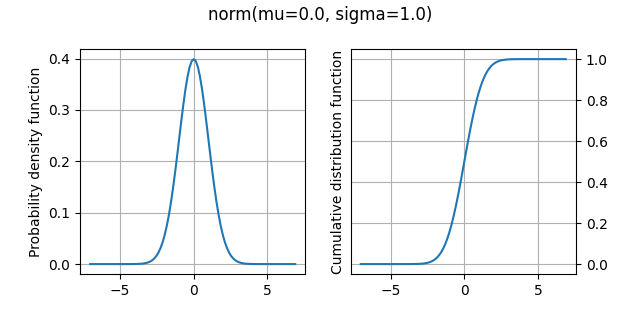
<Figure size 640x320 with 2 Axes>
Get statistics#
Mean#
We can access the mean of the distribution:
distribution_0_1.mean
np.float64(0.0)
Standard deviation#
We can access the standard deviation of the distribution:
distribution_0_1.standard_deviation
np.float64(1.0)
Numerical range#
We can access the range, i.e. the difference between the numerical minimum and maximum, of the distribution:
distribution_0_1.range
array([-7.03448383, 7.03448691])
Mathematical support#
We can access the range, i.e. the difference between the minimum and maximum, of the distribution:
distribution_0_1.support
array([-inf, inf])
Evaluate CDF#
We can evaluate the cumulative density function:
distribution_0_1.compute_cdf(0.5)
np.float64(0.6914624612740131)
Evaluate inverse CDF#
We can evaluate the inverse cumulative density function, here the quantile at 97.5%:
distribution_0_1.compute_inverse_cdf(0.975)
np.float64(1.959963984540054)
Generate samples#
We can generate 10 samples of the distribution:
distribution_0_1.compute_samples(10)
array([ 0.74094511,  0.0820873 , -0.23021294, -0.07620066, -1.82483552,
       -0.88207143, -0.50546445, -0.25714944,  1.78600828, -3.28449264])
Total running time of the script: (0 minutes 0.070 seconds)