
Note
Go to the end to download the full example code.
Renaming variables#
from __future__ import annotations

from numpy import array

from gemseo.disciplines.analytic import AnalyticDiscipline
from gemseo.utils.discipline import VariableRenamer
from gemseo.utils.discipline import VariableTranslation
from gemseo.utils.discipline import rename_discipline_variables
In the context of a multidisciplinary study, the disciplines must use a common naming convention so that GEMSEO can automatically connect them.
Unfortunately, model suppliers sometimes use different conventions. For example, the output of one model and the input of another model represent the same parameter in the study.
The gemseo.utils.discipline module includes capabilities
enabling these models to be connected automatically using a set of translations.
Renaming discipline variables from translators#
rename_discipline_variables() is a function
to rename some discipline variables from a dictionary of translators
of the form {discipline_name: {variable_name: new_variable_name}}.
For example,
let us consider four analytic disciplines.
There is the first discipline, named "A",
for which we would like to rename "a" to "x" and "c" to "z":
disciplines = [AnalyticDiscipline({"c": "2*a"}, name="A")]
the second discipline, named "C", to be used as is:
disciplines.append(AnalyticDiscipline({"t": "3*g"}, name="C"))
the third disciplines, also named "A",
for which we would like to rename "a" to "x" and "c" to "z"
(as said above):
disciplines.append(AnalyticDiscipline({"c": "4*a"}, name="A"))
and the last one, named "B",
for which we would like to rename "b" to "y":
disciplines.append(AnalyticDiscipline({"b": "5*j"}, name="B"))
The following nested dictionary indexed by the discipline names defines the translators:
translators = {"A": {"a": "x", "c": "z"}, "B": {"b": "y"}}
Finally, we can rename the input and output variables of the disciplines:
rename_discipline_variables(disciplines, translators)
WARNING - 16:15:14: The discipline 'C' has no translator.
and verify that the renaming has been done correctly:
disc_a, disc_c, other_disc_a, disc_b = disciplines
assert disc_a.execute({"x": array([3.0])})["z"] == array([6.0])
assert disc_c.execute({"g": array([3.0])})["t"] == array([9.0])
assert other_disc_a.execute({"x": array([3.0])})["z"] == array([12.0])
assert disc_b.execute({"j": array([3.0])})["y"] == array([15.0])
Tip
Creating the nested dictionary translators can be a pain
when there is a lot of disciplines and a lot of variables to rename.
The following sections present some tools to facilitate its creation.
Create translators easily#
Variable translation#
First,
we need to introduce the notion of VariableTranslation
to translate a discipline variable name according to a global taxonomy:
variable_translation = VariableTranslation(
    discipline_name="A", variable_name="a", new_variable_name="x"
)
variable_translation
'A'.'a'='x'
Variable renamer#
Then,
we can create a VariableRenamer from a set of translations
that can include both VariableTranslation instances
and tuples of the form (discipline_name, variable_name, new_variable_name):
renamer = VariableRenamer.from_translations(
    variable_translation,
    ("B", "b", "y"),
    VariableTranslation(discipline_name="A", variable_name="c", new_variable_name="z"),
)
renamer
This object offers a translators property
mapping from discipline names to dictionaries,
themselves mapping from the discipline variable names to the global variable names:
renamer.translators
defaultdict(<class 'dict'>, {'A': {'a': 'x', 'c': 'z'}, 'B': {'b': 'y'}})
You can use these translators to rename the corresponding discipline variables,
by calling the rename_discipline_variables() function
presented in the first section:
rename_discipline_variables(disciplines, renamer.translators).
You can also access the translations:
renamer.translations
('A'.'a'='x', 'B'.'b'='y', 'A'.'c'='z')
Add translations#
Finally,
you can add translations to a VariableRenamer.
One by one#
You can add them one by one
using its add_translation() method:
renamer.add_translation(
    VariableTranslation(discipline_name="Y", variable_name="x", new_variable_name="b")
)
renamer.translations
('A'.'a'='x', 'B'.'b'='y', 'A'.'c'='z', 'Y'.'x'='b')
By discipline#
You can add several translations associated with the same discipline
using its add_translations_by_discipline() method
from a discipline name
and a dictionary of the form {variable_name: new_variable_name}:
renamer.add_translations_by_discipline("T", {"x": "e", "o": "p"})
renamer.translations
('A'.'a'='x', 'B'.'b'='y', 'A'.'c'='z', 'Y'.'x'='b', 'T'.'x'='e', 'T'.'o'='p')
By variable#
You add several translations,
indicating which variables in which disciplines are to be renamed in the same way,
using its add_translations_by_variable() method
from a new variable name
and a dictionary of the form {discipline_name: variable_name}:
renamer.add_translations_by_variable("i", {"A": "r", "B": "m"})
renamer.translations
('A'.'a'='x', 'B'.'b'='y', 'A'.'c'='z', 'Y'.'x'='b', 'T'.'x'='e', 'T'.'o'='p', 'A'.'r'='i', 'B'.'m'='i')
Define the renamer from a dictionary#
You can also use a nested dictionary
of the form {discipline_name: {variable_name: new_variable_name}}
to create the VariableRenamer:
renamer = VariableRenamer.from_dictionary({"A": {"a": "x", "c": "z"}, "B": {"b": "y"}})
renamer.translators
defaultdict(<class 'dict'>, {'A': {'a': 'x', 'c': 'z'}, 'B': {'b': 'y'}})
Define the renamer from a file#
Lastly,
The VariableRenamer can easily be created from a file,
which may be more convenient from a user point of view.
From a CSV file#
Given a CSV file whose rows are translations and columns denote the name of the source discipline, the name of the variable within the source discipline, the name of the target discipline and the name of the variable with the target discipline:
A,a,x
B,b,y
A,c,z
we can create this object with the following lines:
renamer = VariableRenamer.from_csv(file_path)
translators = renamer.translators
Tip
Use the sep argument to use a separator character other than ",".
From a spreadsheet file#
Given a spreadsheet file whose rows are translations and columns denote the name of the discipline, the name of the variable, and the new name of the discipline:
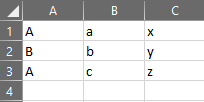
we can create this object with the following lines:
renamer = VariableRenamer.from_spread_sheet(file_path)
translators = renamer.translators
Total running time of the script: (0 minutes 0.016 seconds)