
Note
Go to the end to download the full example code.
Application: Sobieski's Super-Sonic Business Jet (MDO)#
This section describes how to setup and solve the MDO problem relative to the Sobieski test case with GEMSEO.
See also
To begin with a more simple MDO problem, and have a detailed description of how to plug a test case to GEMSEO, see A from scratch example on the Sellar problem.
Solving with an MDF formulation#
In this example, we solve the range optimization using the following MDF formulation:
The MDF formulation couples all the disciplines during the Multi Disciplinary Analyses at each optimization iteration.
All the design variables are equally treated, concatenated in a single vector and given to a single optimization algorithm as the unknowns of the problem.
There is no specific constraint due to the MDF formulation.
Only the design constraints \(g\_1\), \(g\_2\) and \(g\_3\) are added to the problem.
The objective function is the range (the \(y\_4\) variable in the model), computed after the Multi Disciplinary Analyses.
Imports#
All the imports needed for the tutorials are performed here. Note that some of the imports are related to the Python 2/3 compatibility.
from __future__ import annotations

from gemseo import create_discipline
from gemseo import create_scenario
from gemseo import get_available_formulations
from gemseo.core.derivatives.jacobian_assembly import JacobianAssembly
from gemseo.problems.mdo.sobieski.core.design_space import SobieskiDesignSpace
from gemseo.settings.mda import MDAGaussSeidel_Settings
from gemseo.settings.opt import NLOPT_SLSQP_Settings
from gemseo.utils.discipline import get_all_inputs
from gemseo.utils.discipline import get_all_outputs
Step 1: Discipline creation.#
To build the scenario, we first instantiate the disciplines. Here, the disciplines themselves have already been developed and interfaced with GEMSEO (see Benchmark problems).
disciplines = create_discipline([
    "SobieskiPropulsion",
    "SobieskiAerodynamics",
    "SobieskiMission",
    "SobieskiStructure",
])
Tip
For the disciplines that are not interfaced with GEMSEO, the GEMSEO's
gemseo module eases the creation of disciplines without having
to import them.
See API reference.
Step 2: Scenario creation.#
The scenario delegates the creation of the optimization problem to the MDO formulation.
Therefore, it needs the list of disciplines, the names of the formulation,
the name of the objective function and the design space.
The
design_space(shown below for reference, asdesign_space.txt) defines the unknowns of the optimization problem, and their bounds. It contains all the design variables needed by the MDF formulation. It can be imported from a text file, or created from scratch with the methodscreate_design_space()andDesignSpace.add_variable(). In this case, we will create it directly from the API.
design_space = SobieskiDesignSpace()
vi design_space.csv

name      lower_bound      value      upper_bound  type
x_shared      0.01          0.05          0.09     float
x_shared    30000.0       45000.0       60000.0    float
x_shared      1.4           1.6           1.8      float
x_shared      2.5           5.5           8.5      float
x_shared      40.0          55.0          70.0     float
x_shared     500.0         1000.0        1500.0    float
x_1           0.1           0.25          0.4      float
x_1           0.75          1.0           1.25     float
x_2           0.75          1.0           1.25     float
x_3           0.1           0.5           1.0      float
y_14        24850.0    50606.9741711    77100.0    float
y_14        -7700.0    7306.20262124    45000.0    float
y_32         0.235       0.50279625      0.795     float
y_31         2960.0    6354.32430691    10185.0    float
y_24          0.44       4.15006276      11.13     float
y_34          0.44       1.10754577       1.98     float
y_23         3365.0    12194.2671934    26400.0    float
y_21        24850.0    50606.9741711    77250.0    float
y_12        24850.0      50606.9742     77250.0    float
y_12          0.45          0.95          1.5      float
The available MDO formulations are located in the gemseo.formulations package, see Extend GEMSEO features for extending GEMSEO with other formulations.
The
formulationclass name (here,"MDF") shall be passed to the scenario to select them.The list of available formulations can be obtained by using
get_available_formulations().
get_available_formulations()
['BiLevel', 'BiLevelBCD', 'DisciplinaryOpt', 'IDF', 'MDF']
\(y\_4\) corresponds to the
objective_name. This name must be one of the disciplines outputs, here the "SobieskiMission" discipline. The list of all outputs of the disciplines can be obtained by usingget_all_outputs():
get_all_outputs(disciplines)
get_all_inputs(disciplines)
['c_0', 'c_1', 'c_2', 'c_3', 'c_4', 'x_1', 'x_2', 'x_3', 'x_shared', 'y_12', 'y_14', 'y_21', 'y_23', 'y_24', 'y_31', 'y_32', 'y_34']
From these Discipline, design space filename,
MDO formulation name and objective function name,
we build the scenario.
During the instantiation of the scenario, we provide some options for the
MDF formulations. The MDF formulation includes an MDA, and thus one of the settings of
the formulation is main_mda_settings, which configures the solver for the strong
couplings.
main_mda_settings = MDAGaussSeidel_Settings(
    tolerance=1e-14,
    max_mda_iter=50,
    warm_start=True,
    use_lu_fact=False,
    linear_solver_tolerance=1e-14,
)
scenario = create_scenario(
    disciplines,
    "y_4",
    design_space,
    formulation_name="MDF",
    maximize_objective=True,
    main_mda_settings=main_mda_settings,
)
The range function (\(y\_4\)) should be maximized. However, optimizers
minimize functions by default. Which is why, when creating the scenario, the argument
maximize_objective shall be set to True.
Scenario options#
We may provide additional options to the scenario:
Function derivatives. As analytical disciplinary derivatives are
available for Sobieski test-case, they can be used instead of computing
the derivatives with finite differences or with the complex step method.
The easiest way to set it is the method
BaseScenario.set_differentiation_method():
scenario.set_differentiation_method()
The default behavior uses the analytical derivatives defined in
Discipline._compute_jacobian(). Otherwise, the finite differences method can
be set as follows:
scenario.set_differentiation_method("finite_differences",1e-7)
It is also possible to differentiate functions by means of the complex step method:
scenario.set_differentiation_method("complex_step",1e-30j)
Constraints#
Similarly to the objective function, the constraints names are a subset
of the disciplines' outputs. They can be obtained by using
get_all_outputs().
The formulation has a powerful feature to automatically dispatch the constraints
(\(g\_1, g\_2, g\_3\)) and plug them to the optimizers depending on
the formulation. To do that, we use the method
BaseScenario.add_constraint():
for constraint in ["g_1", "g_2", "g_3"]:
    scenario.add_constraint(constraint, constraint_type="ineq")
Step 3: Execution and visualization of the results#
The scenario is executed from
an optimization algorithm name (see Optimization algorithms),
a maximum number of iterations
and possibly a few options.
The maximum number of iterations and the options can be passed
either as keyword arguments
e.g. scenario.execute(algo_name="NLOPT_SLSQP", max_iter=10, ftol_rel=1e-6)
or as a Pydantic model of settings,
e.g. scenario.execute(NLOPT_SLSQP_Settings(max_iter=10, ftol_rel=1e-6))
where the Pydantic model NLOPT_SLSQP_Settings is imported from
gemseo.settings.opt.
In this example, we use the Pydantic model:
slsqp_settings = NLOPT_SLSQP_Settings(
    max_iter=10,
    ftol_rel=1e-10,
    ineq_tolerance=2e-3,
    normalize_design_space=True,
)
scenario.execute(slsqp_settings)
INFO - 16:16:18: *** Start MDOScenario execution ***
INFO - 16:16:18: MDOScenario
INFO - 16:16:18:    Disciplines: SobieskiAerodynamics SobieskiMission SobieskiPropulsion SobieskiStructure
INFO - 16:16:18:    MDO formulation: MDF
INFO - 16:16:18: Optimization problem:
INFO - 16:16:18:    minimize -y_4(x_shared, x_1, x_2, x_3)
INFO - 16:16:18:    with respect to x_1, x_2, x_3, x_shared
INFO - 16:16:18:    under the inequality constraints
INFO - 16:16:18:       g_1(x_shared, x_1, x_2, x_3) <= 0
INFO - 16:16:18:       g_2(x_shared, x_1, x_2, x_3) <= 0
INFO - 16:16:18:       g_3(x_shared, x_1, x_2, x_3) <= 0
INFO - 16:16:18:    over the design space:
INFO - 16:16:18:       +-------------+-------------+-------+-------------+-------+
INFO - 16:16:18:       | Name        | Lower bound | Value | Upper bound | Type  |
INFO - 16:16:18:       +-------------+-------------+-------+-------------+-------+
INFO - 16:16:18:       | x_shared[0] |     0.01    |  0.05 |     0.09    | float |
INFO - 16:16:18:       | x_shared[1] |    30000    | 45000 |    60000    | float |
INFO - 16:16:18:       | x_shared[2] |     1.4     |  1.6  |     1.8     | float |
INFO - 16:16:18:       | x_shared[3] |     2.5     |  5.5  |     8.5     | float |
INFO - 16:16:18:       | x_shared[4] |      40     |   55  |      70     | float |
INFO - 16:16:18:       | x_shared[5] |     500     |  1000 |     1500    | float |
INFO - 16:16:18:       | x_1[0]      |     0.1     |  0.25 |     0.4     | float |
INFO - 16:16:18:       | x_1[1]      |     0.75    |   1   |     1.25    | float |
INFO - 16:16:18:       | x_2         |     0.75    |   1   |     1.25    | float |
INFO - 16:16:18:       | x_3         |     0.1     |  0.5  |      1      | float |
INFO - 16:16:18:       +-------------+-------------+-------+-------------+-------+
INFO - 16:16:18: Solving optimization problem with algorithm NLOPT_SLSQP:
INFO - 16:16:18:     10%|█         | 1/10 [00:00<00:00, 26.88 it/sec, feas=False, obj=-536]
INFO - 16:16:18:     20%|██        | 2/10 [00:00<00:00, 31.40 it/sec, feas=False, obj=-2.12e+3]
INFO - 16:16:18:     30%|███       | 3/10 [00:00<00:00, 33.06 it/sec, feas=True, obj=-3.46e+3]
INFO - 16:16:18:     40%|████      | 4/10 [00:00<00:00, 34.59 it/sec, feas=False, obj=-4.45e+3]
INFO - 16:16:18:     50%|█████     | 5/10 [00:00<00:00, 39.61 it/sec, feas=False, obj=-4.18e+3]
INFO - 16:16:18:     60%|██████    | 6/10 [00:00<00:00, 43.92 it/sec, feas=False, obj=-3.86e+3]
INFO - 16:16:18:     70%|███████   | 7/10 [00:00<00:00, 43.34 it/sec, feas=False, obj=-3.69e+3]
INFO - 16:16:18:     80%|████████  | 8/10 [00:00<00:00, 42.82 it/sec, feas=True, obj=-3.96e+3]
INFO - 16:16:18:     90%|█████████ | 9/10 [00:00<00:00, 42.63 it/sec, feas=True, obj=-3.96e+3]
INFO - 16:16:18:    100%|██████████| 10/10 [00:00<00:00, 42.53 it/sec, feas=True, obj=-3.96e+3]
INFO - 16:16:18: Optimization result:
INFO - 16:16:18:    Optimizer info:
INFO - 16:16:18:       Status: None
INFO - 16:16:18:       Message: Maximum number of iterations reached. GEMSEO stopped the driver.
INFO - 16:16:18:    Solution:
INFO - 16:16:18:       The solution is feasible.
INFO - 16:16:18:       Objective: -3964.170448501361
INFO - 16:16:18:       Standardized constraints:
INFO - 16:16:18:          g_1 = [-0.01816104 -0.03341834 -0.04430538 -0.05188028 -0.05736466 -0.13720865
INFO - 16:16:18:  -0.10279135]
INFO - 16:16:18:          g_2 = 3.630903829798804e-05
INFO - 16:16:18:          g_3 = [-0.76773712 -0.23226288  0.00083037 -0.183255  ]
INFO - 16:16:18:       Design space:
INFO - 16:16:18:          +-------------+-------------+---------------------+-------------+-------+
INFO - 16:16:18:          | Name        | Lower bound |        Value        | Upper bound | Type  |
INFO - 16:16:18:          +-------------+-------------+---------------------+-------------+-------+
INFO - 16:16:18:          | x_shared[0] |     0.01    | 0.06000907725957451 |     0.09    | float |
INFO - 16:16:18:          | x_shared[1] |    30000    |        60000        |    60000    | float |
INFO - 16:16:18:          | x_shared[2] |     1.4     |         1.4         |     1.8     | float |
INFO - 16:16:18:          | x_shared[3] |     2.5     |         2.5         |     8.5     | float |
INFO - 16:16:18:          | x_shared[4] |      40     |          70         |      70     | float |
INFO - 16:16:18:          | x_shared[5] |     500     |         1500        |     1500    | float |
INFO - 16:16:18:          | x_1[0]      |     0.1     |         0.4         |     0.4     | float |
INFO - 16:16:18:          | x_1[1]      |     0.75    |         0.75        |     1.25    | float |
INFO - 16:16:18:          | x_2         |     0.75    |         0.75        |     1.25    | float |
INFO - 16:16:18:          | x_3         |     0.1     |  0.1563744859357456 |      1      | float |
INFO - 16:16:18:          +-------------+-------------+---------------------+-------------+-------+
INFO - 16:16:18: *** End MDOScenario execution ***
Post-processing options#
A whole variety of visualizations may be displayed for both MDO and DOE scenarios. These features are illustrated on the SSBJ use case in How to deal with post-processing.
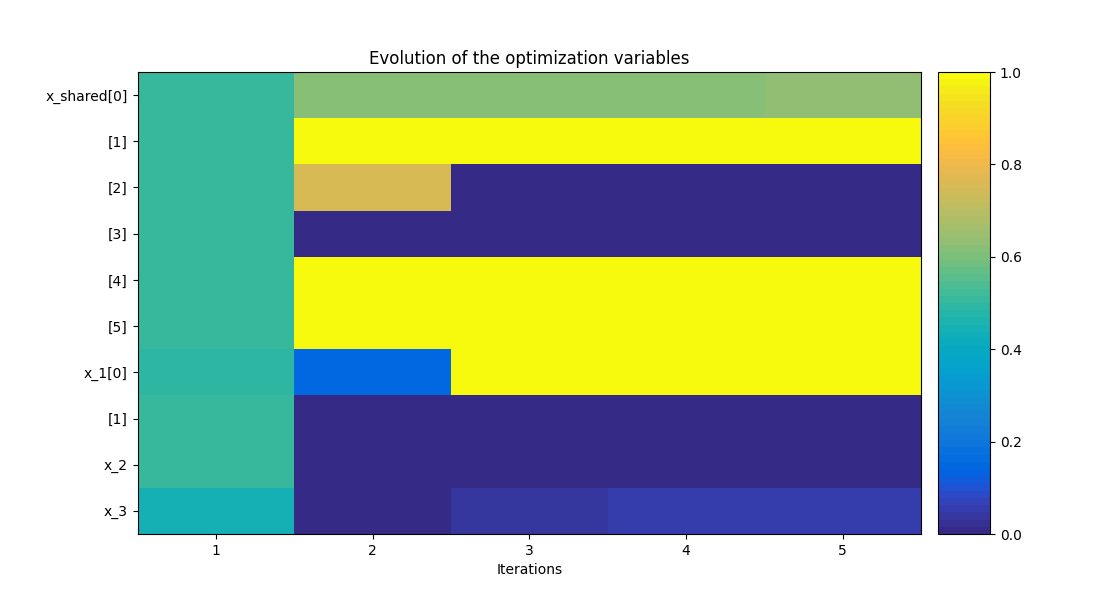
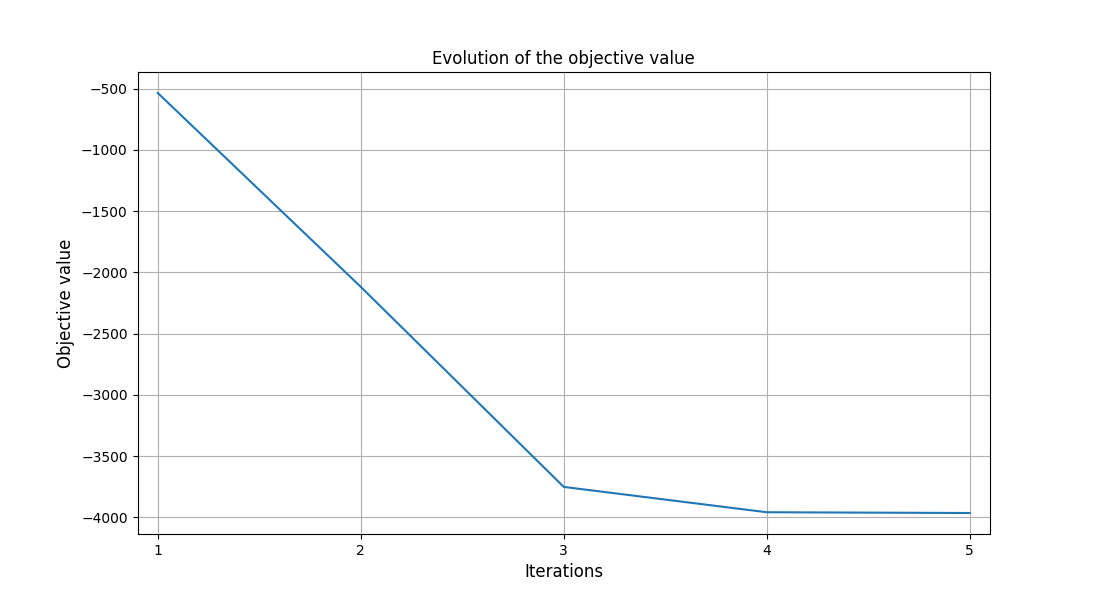
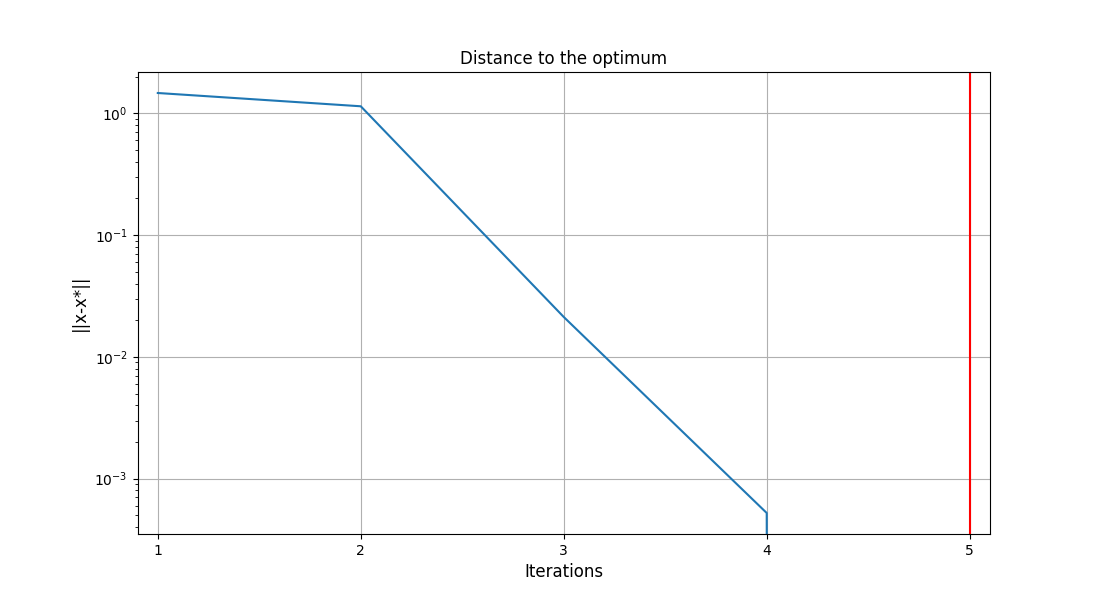
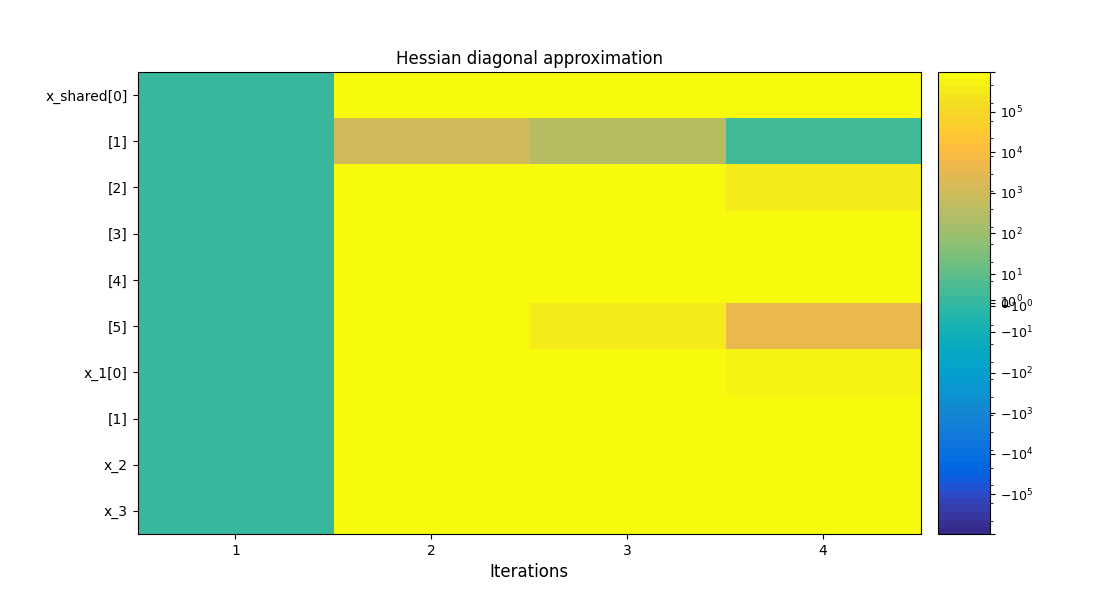
To visualize the optimization history:
scenario.post_process(post_name="OptHistoryView", save=False, show=True)
<gemseo.post.opt_history_view.OptHistoryView object at 0x7c4bcf08da00>
Influence of gradient computation method on performance#
As mentioned in Coupled derivatives and gradients computation, several methods are available in order to perform the gradient computations: classical finite differences, complex step and Multi Disciplinary Analyses linearization in direct or adjoint mode. These modes are automatically selected by GEMSEO to minimize the CPU time. Yet, they can be forced on demand in each Multi Disciplinary Analyses:
scenario.formulation.mda.linearization_mode = JacobianAssembly.DerivationMode.DIRECT
scenario.formulation.mda.matrix_type = JacobianAssembly.JacobianType.LINEAR_OPERATOR
The method used to solve the adjoint or direct linear problem may also be selected. GEMSEO can either assemble a sparse residual Jacobian matrix of the Multi Disciplinary Analyses from the disciplines matrices. This has the advantage that LU factorizations may be stored to solve multiple right hand sides problems in a cheap way. But this requires extra memory.
scenario.formulation.mda.matrix_type = JacobianAssembly.JacobianType.MATRIX
scenario.formulation.mda.use_lu_fact = True
Alternatively, GEMSEO can implicitly create a matrix-vector product operator, which is sufficient for GMRES-like solvers. It avoids to create an additional data structure. This can also be mandatory if the disciplines do not provide full Jacobian matrices but only matrix-vector product operators.
scenario.formulation.mda.matrix_type = JacobianAssembly.JacobianType.LINEAR_OPERATOR
The next table shows the performance of each method for solving the Sobieski use case with MDF and IDF formulations. The efficiency of linearization is clearly visible as it takes from 10 to 20 times less CPU time to compute analytic derivatives of an Multi Disciplinary Analyses compared to finite difference and complex step. For IDF, improvements are less consequent, but direct linearization is more than 2.5 times faster than other methods.
Derivation Method |
Execution time (s) |
|
|---|---|---|
Finite differences |
8.22 |
1.93 |
Complex step |
18.11 |
2.07 |
Linearized (direct) |
0.90 |
0.68 |
Total running time of the script: (0 minutes 0.677 seconds)