
Multi Disciplinary Analyses#
This section deals with the construction and execution of a Multi Disciplinary Analysis, abbreviated MDA. MDAs are required when dealing with coupled disciplines, that is when inputs of disciplines are outputs of others. Such variables are referred to as the coupling variables.
Note
In GEMSEO, the MDA objects all inherit from BaseMDA.
For a given set of coupled disciplines, the MDA solves for the coupling variables. Mathematically, it reduces to the solution of a non-linear system of equations by block of the form \(R(x, y^{\star}) = 0\) where \(y^{\star}\) represents the solution for the coupling variables and \(x\) the remaining variables. These latter variables parametrize the system of equations, i.e. for a fixed \(x\), the MDA computes \(y^{\star}\) such that \(R(x, y^{\star}) = 0\).
There are two main categories of MDA objects in GEMSEO:
The ones implementating a non-linear solver (inheriting from
BaseMDASolver),The composed MDA, that creates and/or uses inner MDA solvers (more information below).
The following sub-sections present an overview of these two kinds of available MDAs.
See also
The examples about MDA algorithms can be found here
Non-linear solver algorithms#
The available non-linear solvers available in GEMSEO can be split in two categories:
- fixed-point methods, that compute fixed points of a coupling function \(F\),
that is they solve equations of the form \(F(y) = y\). The available fixed-point methods available in GEMSEO are the Jacobi and Gauss-Seidel. methods.
- root finding methods that solves non-linear systems of equations of the form
\(R(y) = 0\). The root finding algorithms available in GEMSEO are the Newton-Raphson method which uses the (possibly partial) derivatives \(\partial R(y) / \partial y\), and several derivative-free variants known as quasi-Newton methods.
Note
A fixed-point problem can be reformulated as a root finding problem and reciprocally, since \(R(y) = 0 \iff R(y) + y = y \iff F(y) = y\) with \(F(y) = R(y) + y\).
To create an MDA, use the create_mda() API function, specifying the name of the
MDA class and the (coupled) disciplines.
from gemseo import create_mda, create_discipline
from gemseo.mda.quasi_newton_settings import QuasiNewtonMethod

# Instantiate the coupled Sellar disciplines
disciplines = create_discipline(["Sellar1", "Sellar2"])

# Create an MDA based on fixed-point methods
mda_jacobi = create_mda("MDAJacobi", disciplines)
mda_gauss_seidel = create_mda("MDAGaussSeidel", disciplines)

# Create an MDA based on root finding methods
mda_newton = create_mda("MDANewtonRaphson", disciplines)
mda_quasi_newton = create_mda(
    "MDAQuasiNewton",
    disciplines,
    method=QuasiNewtonMethod.BROYDEN1,
)
Warning
Any Discipline provided to a BaseMDA with strong couplings
must define its Discipline.default_input_data. Otherwise, the execution
will fail.
Composed MDA methods#
The two composed MDAs available in GEMSEO are the MDASequential and the
MDAChain.
The sequential MDA#
The MDASequential implements a generic mechanism to execute sequentially an
arbitrary number of inner MDAs. An example is given in the following code:
mda_1 = create_mda("MDAJacobi", disciplines, max_mda_iter=2)
mda_2 = create_mda("MDANewtonRaphson", disciplines)
mda_sequential = create_mda("MDASequential", disciplines, mda_sequence=[mda1, mda2])
In this example, the sequential MDA will perform 2 iterations of the Jacobi's method, before switching to the Newton-Raphson's method. This approach is interesting since the Newton-Raphson's is more expensive, but converges quickly close to the solution. This kind of sequences typically takes advantage of the robustness of fixed-point methods while obtaining an accurate solution thanks to a Newton-Raphson's method.
Note
A specific instance of sequential MDA, namely the MDAGSNewton is readily
available in GEMSEO. It starts with the Gauss-Seidel's method before switching to the
Newton-Raphson's method.
The MDA chain#
The MDAChain implements an advanced graph-based algorithm which allows, when
possible, to split the solution of the non-linear system of equations into smaller and
weakly coupled ones. The next figure illustrates this process on a 16 coupled
disciplines toy problem.
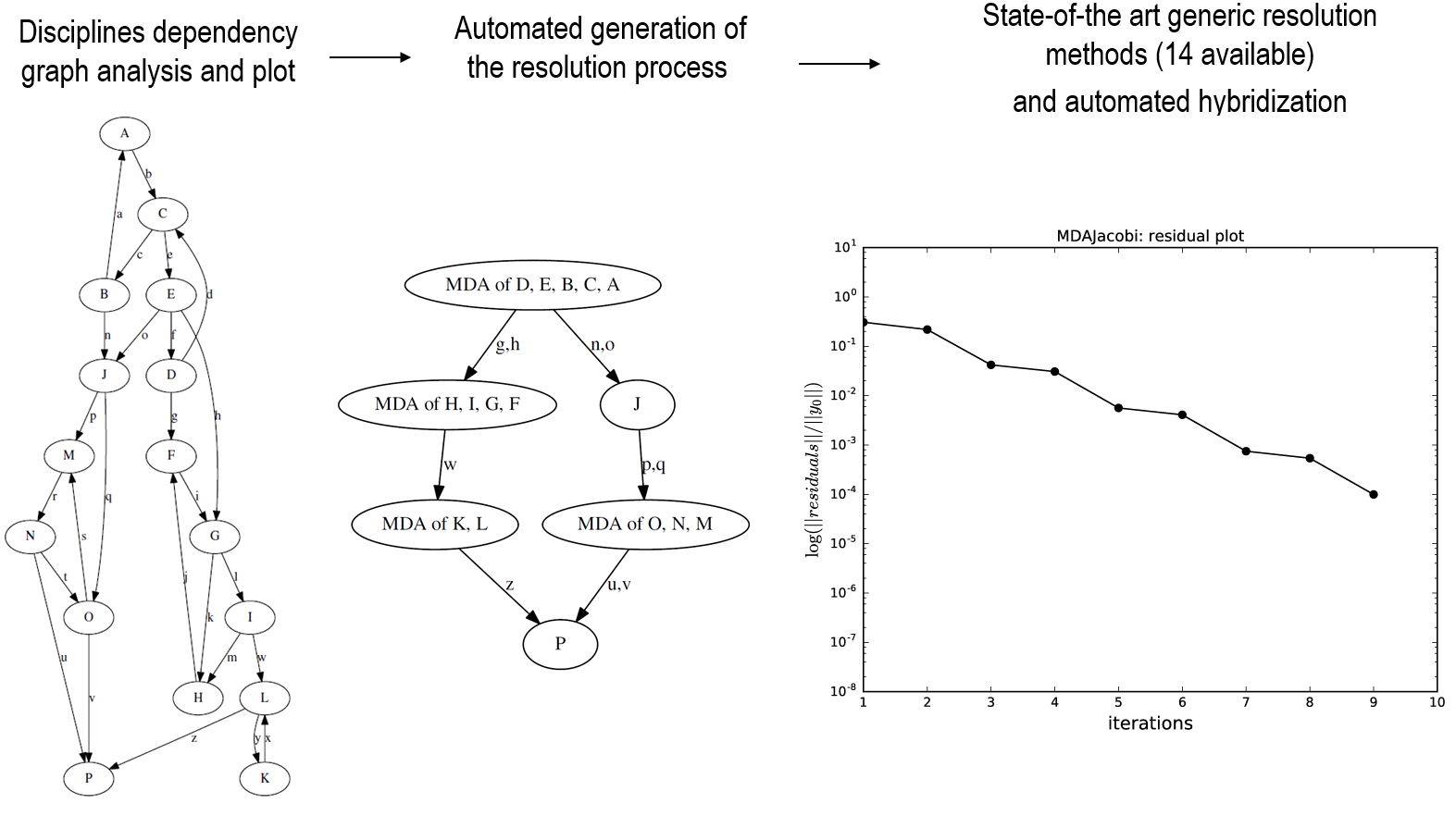
The 3 resolution phases of a 16 disciplines coupling problem.#
The MDA chain inspects the coupling graph and automatically detects strongly coupled
disciplines. In the example above, the problem is split into 4 sub-systems, for which
an inner MDA implementing a non-linear solver is used. As an example, the following code
will create an MDA chain, that will solve the sub-systems using Jacobi's method. The
solver for the sub-systems is specified via the inner_mda_name setting.
mda = create_mda("MDAChain", disciplines, inner_mda_name="MDAJacobi")
MDA classes organization#
Here is the UML diagram of the MDA classes in GEMSEO.

Execution of MDAs#
The MDA inherits from Discipline and can thus be executed and linearized as
any other discipline. As mentioned in the previous section, the MDA solves the
non-linear system of equations induced by coupled disciplines. Formally, it can be
viewed as a function \(\text{MDA}(x, y) = y^{\star}\) that takes \(x\) and
possibly initial values for the coupling variables \(y\) and computes
\(y^{\star}\) that satisfies \(R(x, y^{\star}) = 0\).
Let us take again the Sellar's problem as a toy example, where:
The design variables are labelled \(x_{\text{local}}\) and \(x_{\text{shared}}\).
The coupling variables are labelled \(y_1\) and \(y_2\).
The following code executes the Jacobi's algorithm on the Sellar1 and
Sellar2 disciplines for specific values of the design variables.
from numpy import array

# Instantiate the coupled Sellar disciplines
disciplines = create_discipline(["Sellar1", "Sellar2"])

# Create an MDA based on the Jacobi's fixed-point methods
mda_jacobi = create_mda("MDAJacobi", disciplines)

# Execute the MDA for specific design variables
mda_jacobi.execute({"x_local": array([0.5]), "x_shared": array([0.25, 0.25])})
print(
    "Jacobi's method reached termination criterion "
    f"after {mda_jacobi._current_iter} iterations: "
    f"normalized residual norm = {mda_jacobi.normed_residual}"
)
Stopping criteria#
The MDA solvers convergence can be monitored by two criteria: - The maximum number of iterations, - The tolerance on the normalized residual norm.
These settings can be either specified at MDA creation or updated on the MDA object directly. Here is an example of the Jacobi's method where the tolerance and the maximum number of iterations are provided:
from gemseo.settings.mda import MDAJacobi_Settings

# Create the settings model
settings = MDAJacobi_Settings(tolerance=1e-6, max_mda_iter=10)

# Create an MDA with specific stopping criteria settings
mda_jacobi = create_mda("MDAJacobi", disciplines, settings_model=settings)

# Execute the MDA with default input data
mda_jacobi.execute()
print(
    "Jacobi's method reached termination criterion "
    f"after {mda_jacobi._current_iter} iterations: "
    f"normalized residual norm = {mda_jacobi.normed_residual}"
)
Note
The tolerance is monitored on a relative decrease on the residual norm. Several scaling strategies for the residual are available in GEMSEO. More information here
Acceleration/relaxation methods#
Acceleration and relaxation methods are available for all the MDAs in GEMSEO. The
acceleration methods available can be found
here.
For instance the following code applies Gauss-Seidel's method with the Secant
acceleration method and an over-relaxation factor of 0.95.
from gemseo.settings.mda import MDAGaussSeidel_Settings
from gemseo.algos.sequence_transformer.acceleration import AccelerationMethod

# Create the settings model
settings = MDAGaussSeidel_Settings(
    acceleration_method=AccelerationMethod.SECANT,
    over_relaxation_factor=0.95,
)

# Create an MDA with a specific acceleration method and relaxation factor
mda_gauss_seidel = create_mda("MDAGaussSeidel", disciplines, settings_model=settings)

# Execute the MDA with default input data
mda_gauss_seidel.execute()
print(
    "Gauss-Seidel's method reached termination criterion "
    f"after {mda_gauss_seidel._current_iter} iterations: "
    f"normalized residual norm = {mda_gauss_seidel.normed_residual}"
)
Monitor the convergence#
The convergence history of the MDA solvers can be accessed via the
BaseMDA.residual_history attribute. More conveniently, there is a dedicated
method as in the following example:
mda_gauss_seidel = create_mda("MDAGaussSeidel", disciplines)

mda_gauss_seidel.execute()
mda_gauss_seidel.plot_residual_history(show=True, save=False)
Advanced features#
In addition with the standard MDA functionnalities, GEMSEO provides more advanced features that can improve performances in certain situations.
Parallelization#
The following MDA algorithms can be parallelized:
MDAJacobi,MDAQuasiNewton,MDANewtonRaphson,MDAChain.
When using parallelization, it is possible to set the number of processes/threads on which the execution will be splitted, and whether to use threads or processes. By default, GEMSEO uses threads and the number of threads is the number of CPUs available on the computer the code is run on. The following code shows an example of settings related to this feature:
# Create the settings model
settings = MDAJacobi_Settings(use_threading=False, n_processes=4)

# Create MDA with specific parallelization settings
mda_jacobi = create_mda("MDAJacobi", disciplines, settings_model=settings)
Re-use coupling structures#
MDAs are created from a set of coupled disciplines. To determine the coupling variables,
a CouplingStructure object is created which uses graph algorithms to analyse
the coupling strcture of the provided disciplines. This process is made once at creation
of the MDA, and only depends on the set of disciplines. The graph analysis can be
expensive if there is a large number of disciplines and/or plenty of inputs/outputs
variables.
Since the coupling structure only depends on the coupled disciplines, it can be computed independently, stored, and then provided to the MDA when needed.
from gemseo.core.coupling_structure import CouplingStructure

# Create the coupling structure on the disciplines
coupling_structure = CouplingStructure(disciplines)

# Create the settings model
settings = MDAGaussSeidel_Settings(coupling_structure=coupling_structure)

# Create an MDA using the already available coupling structure
mda_gauss_seidel = create_mda("MDAGaussSeidel", disciplines, settings_model=settings)